LogoAi Picture Editor
  • Pricing
  • Faq
LogoAi Picture Editor

AI Image Editor

Upload a photo or image, then describe the change you want. Remove backgrounds, replace scenes, restore old photos, create product images, or polish a professional headshot in seconds. No download, no design skills, no signup. Start for free.
No Signup or Login NeededNo Watermark — Ever100% Commercial Use — Your Pictures Are Yours

Upload reference images for image-to-image generation.

AI image editor preview 1
Preparing generatorControls will be ready in a moment.
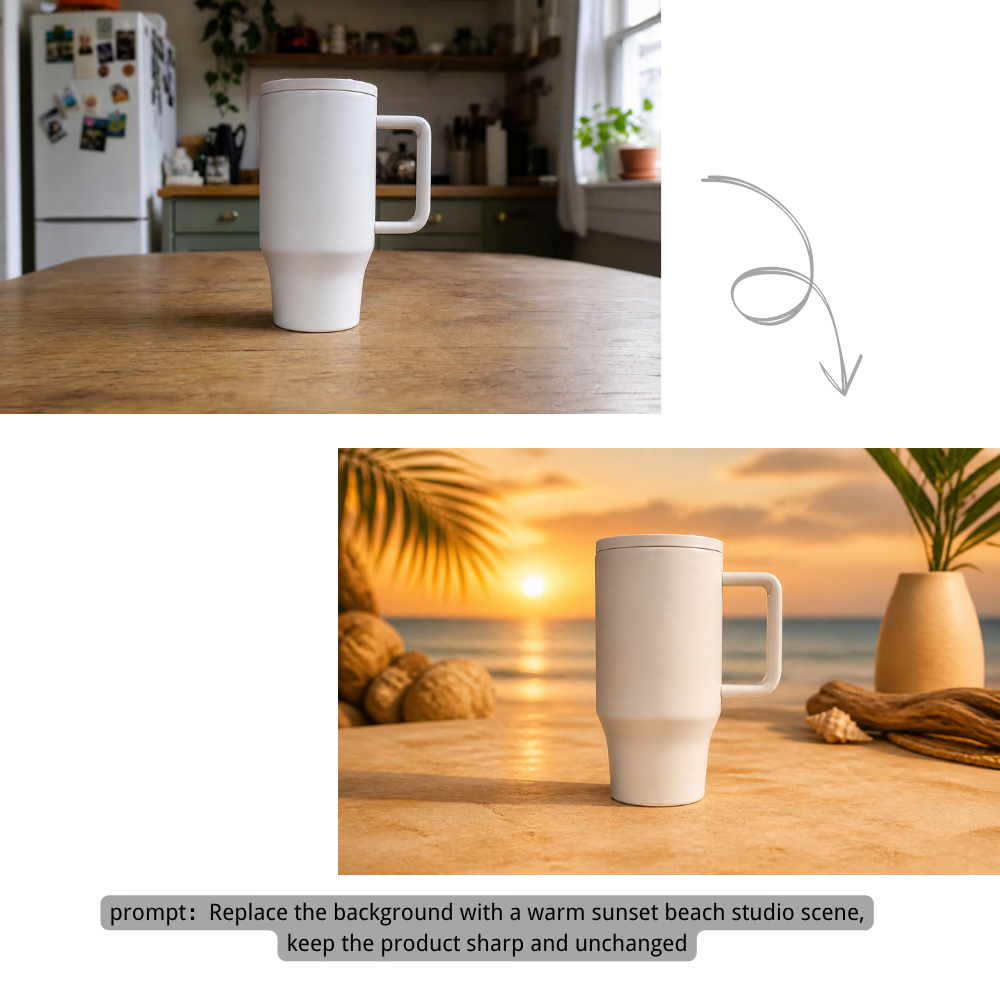
Remove or replace image backgrounds for product photos, portraits, and creative shots.

Background

Replace the background with a warm sunset beach studio scene, keep the product sharp and unchanged

Transform any photo into anime, oil painting, watercolor, or cinematic styles with AI image style transfer.

Style Transfer

Transform this portrait into a cinematic watercolor anime artwork with luminous city lights

Erase unwanted objects, people, watermarks, or add new elements naturally.

Object Editing

Remove the unwanted object from the room and rebuild the floor and light naturally

Retouch portraits, create professional headshots, and polish profile pictures — smooth skin, change hair, brighten eyes, and add expressions.

Portrait

Retouch the portrait naturally: smooth minor blemishes, brighten eyes, and keep real skin texture

Upscale, sharpen, fix lighting, reduce noise, and restore old photo details.

Quality

Restore this old photo, remove scratches, sharpen details, and recover natural colors

Edit Photos and Images with AI

From quick background removal to complete photo restoration, this free online AI photo editor turns simple text prompts into polished results.

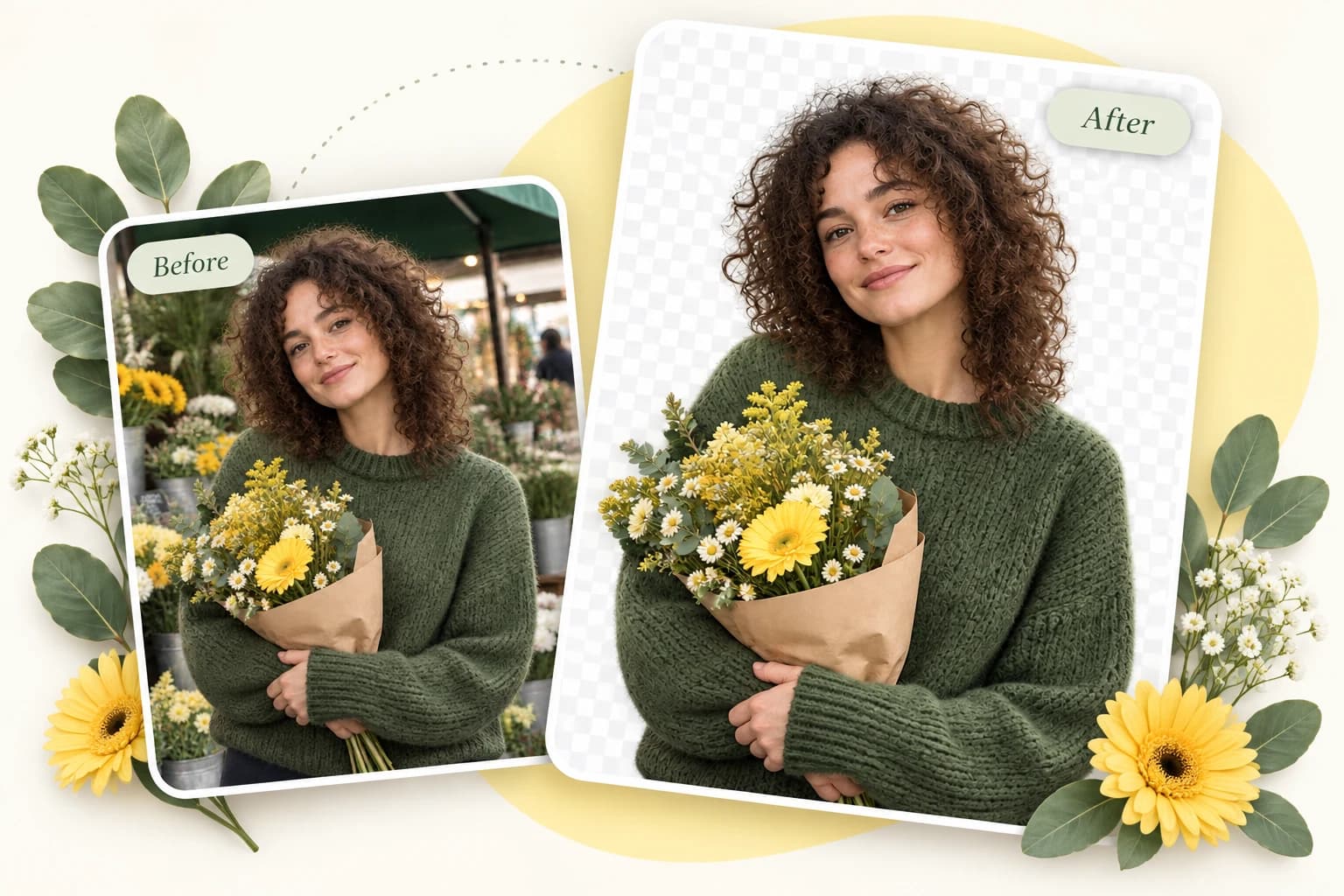
Remove Background in One Click

Remove the background from any picture automatically — hair-level precision, no manual selection needed. Get a clean transparent PNG ready for product listings, profile pictures, or creative composites. The built-in AI picture background remover works instantly.

Remove Background in One Click

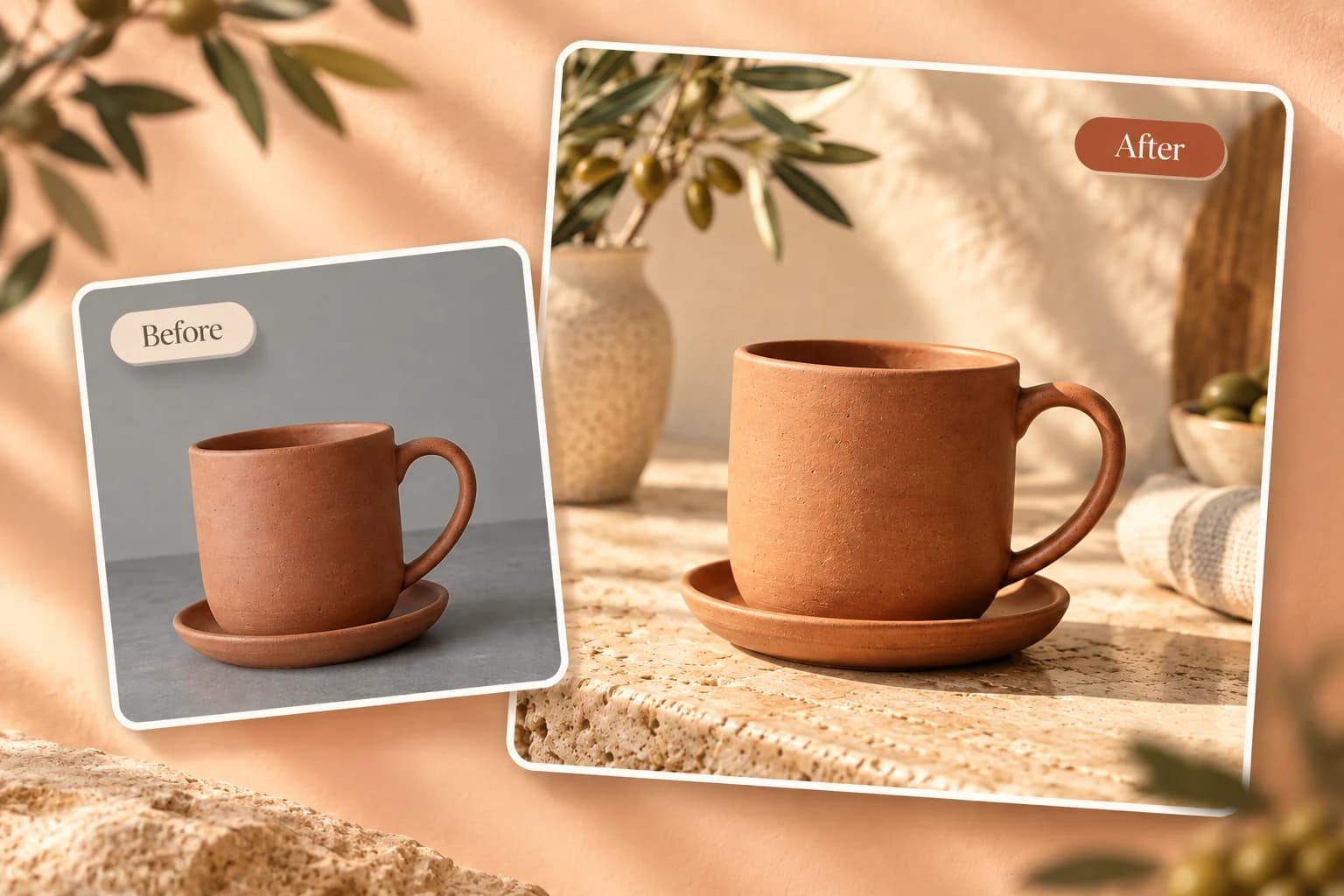
Replace Background with Anything You Describe

Type a scene — "beach at sunset," "modern office," "tropical forest" — and AI places your subject into it. Lighting, shadows, and perspective adjust automatically to make it look real. Background replacement has never been this simple — no green screen, no manual masking needed.

Replace Background with Anything You Describe

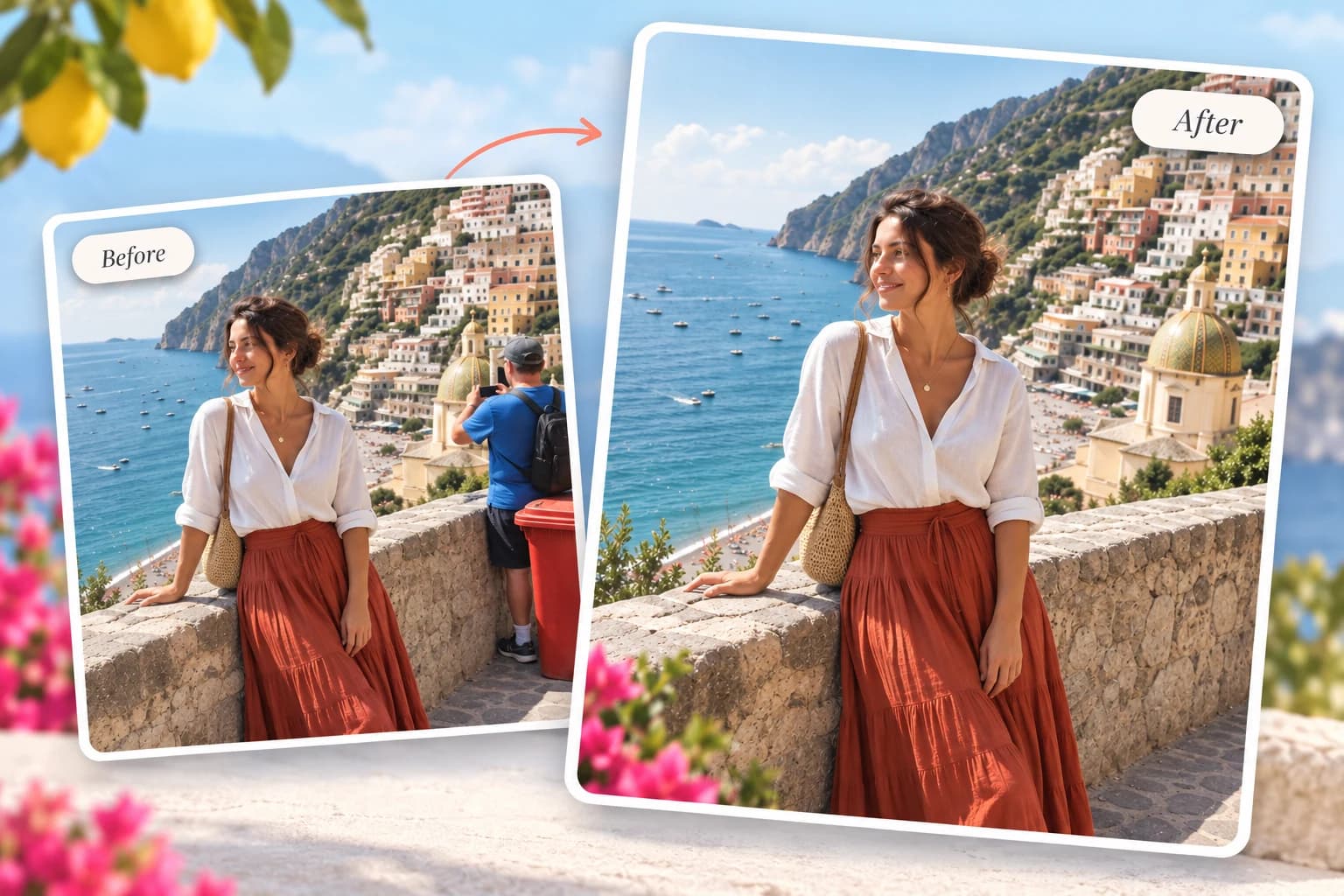
Remove Unwanted Objects Instantly

Brush over the thing you want gone — a photobomber, a logo, a trash can on the sidewalk. AI erases it and fills the area naturally, like it was never there. A prompt-based image editor makes object removal quick and approachable.

Remove Unwanted Objects Instantly

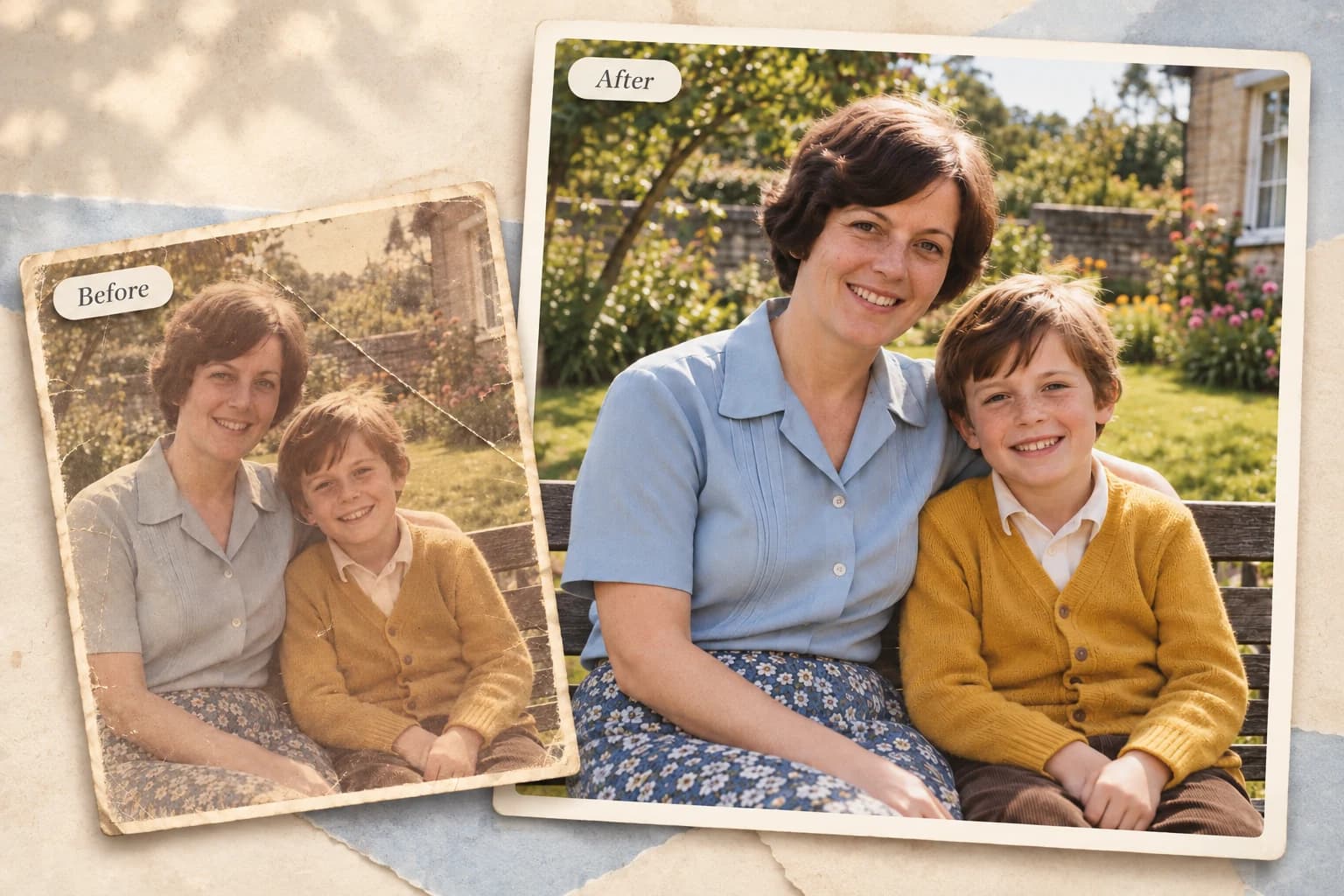
Restore Old Photos to HD

Bring faded, scratched, or blurry old photos back to life with AI old photo restoration. The AI sharpens faces, fixes colors, and removes noise — your grandparents' wedding photo looks like it was taken yesterday. One-click restoration that would take hours with traditional editing tools.

Restore Old Photos to HD

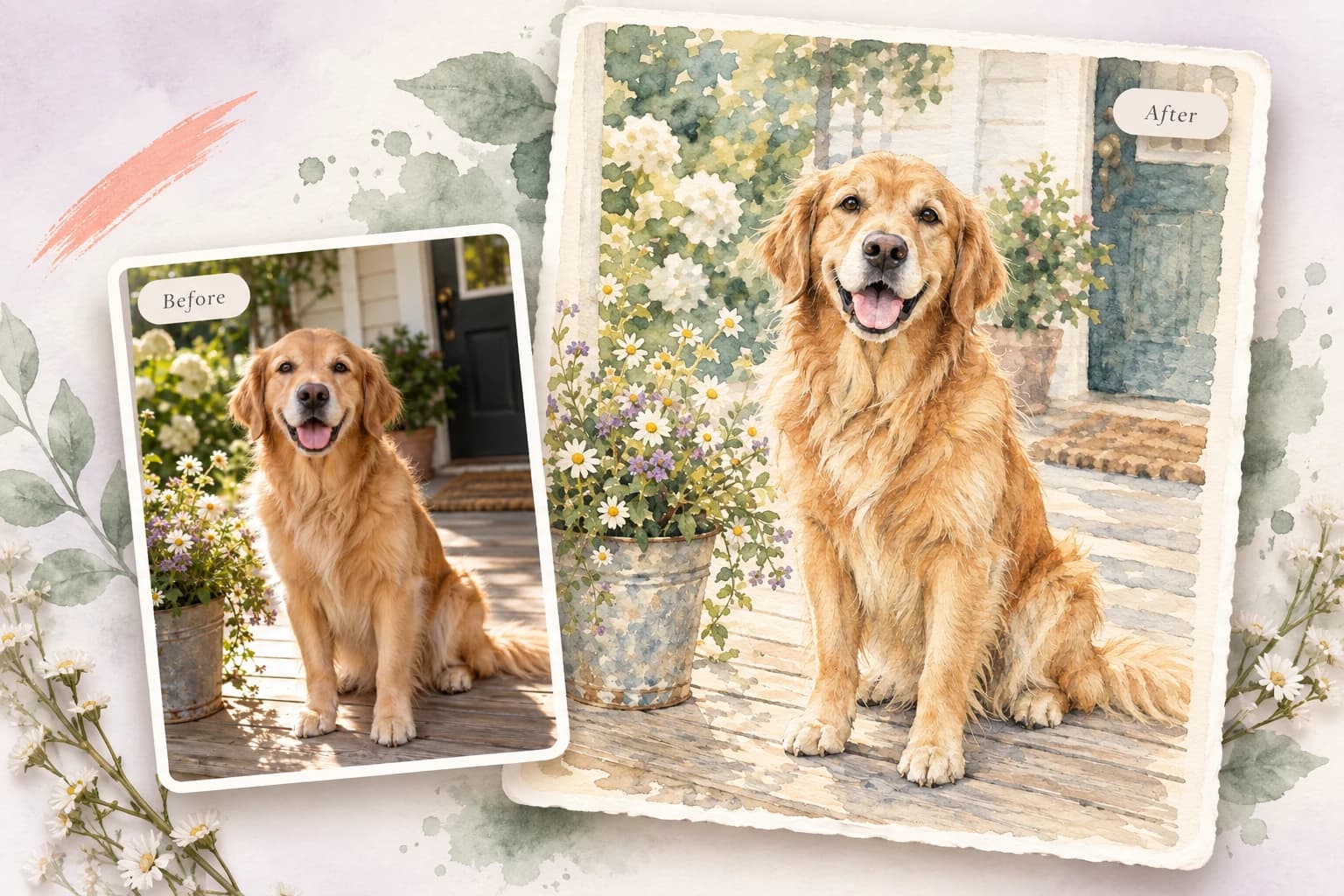
Apply Creative Styles & Filters

Turn a regular photo into Studio Ghibli art, a pencil sketch, a 90s anime scene, or a professional headshot. Explore 50+ looks with AI image style transfer — one click each. No design experience needed.

Apply Creative Styles & Filters

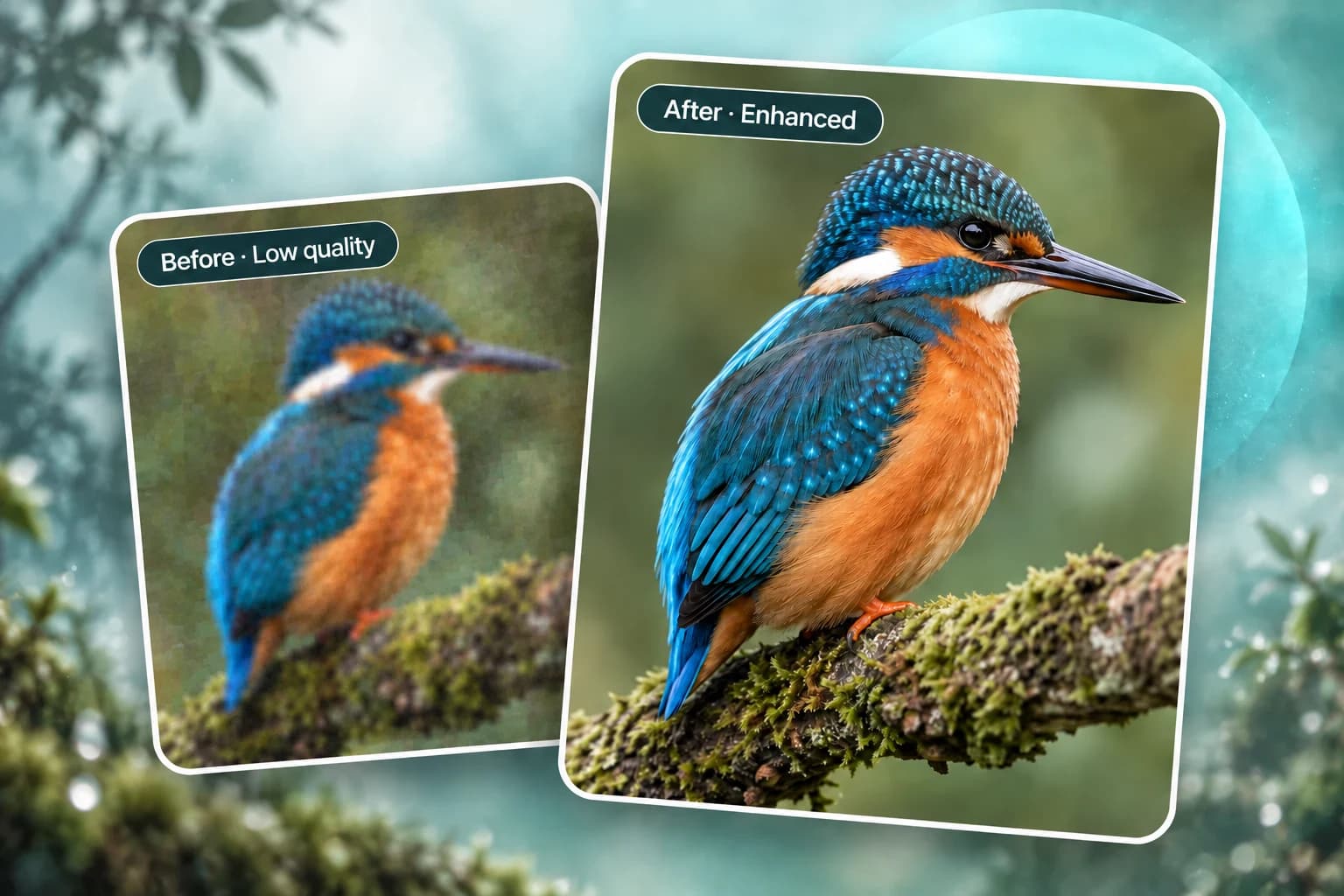
Enhance Picture Quality

Upscale low-res images to HD, sharpen blurry details, and fix bad lighting — all with one click. The AI image enhancer requires no manual adjustments and turns a low-quality snapshot into a crisp, usable image in seconds.

Enhance Picture Quality

How to Edit a Photo with AI — 3 Simple Steps

No downloads, no design skills, no complicated tools. Just upload your picture, describe what you want, and download the result.

1

Upload Your Photo or Image

Drag and drop your image, paste from clipboard, or click to browse. Supports JPG, PNG, and WEBP files up to 25MB. Your picture stays private and is automatically deleted after processing.

2

Describe Your Edit

Type what you want to change in plain English. "Remove the background," "Turn the cat into a lion," or "Make this look like a professional headshot." Prompt-based photo editing means no complex tools, layers, or manual selection — just describe the result.

3

Download Your Edited Image

AI processes your edit in seconds. Preview the result, compare it side-by-side with the original, then download in your preferred format — watermark-free every time. Need to tweak something? Just describe it again and iterate until it's perfect.

Pricing

Choose monthly credits for Ai Picture Editor edits, background changes, object removal, image enhancement, and prompt-guided image generation.

Save 30%

Basic

$15.9/month

For getting started with AI image editing


  • 600 credits included every month
  • Up to 120 standard image edits each month
  • Edit images with prompts, cleanup, and background changes
  • Ideal for product photos, social posts, and quick retouching
  • Full commercial use rights included
  • 24/7 customer support
  • Watermark-free image exports
    Popular

    Pro

    $29.9/month

    For creators who need more output and faster iteration


    • 1,500 credits included every month
    • Up to 300 standard image edits each month
    • Edit images with prompts, cleanup, and background changes
    • Ideal for ecommerce, ads, and frequent creative iteration
    • Full commercial use rights included
    • 24/7 customer support
    • Watermark-free image exports

      Max

      $69.9/month

      For teams and power users with high-volume production


      • 4,000 credits included every month
      • Up to 800 standard image edits each month
      • Edit images with prompts, cleanup, and background changes
      • Built for batch product images, campaigns, and team workflows
      • Full commercial use rights included
      • 24/7 customer support
      • Watermark-free image exports
        Top up

        Need more credits?

        One-time purchase. Add credits anytime — works alongside any plan.

        Best value
        $9.9300credits
        Valid for 30 days300 credits for about 60 standard image edits, valid for 30 daysOther benefits match subscription plans, except for the credit amount

        Who Uses This AI Photo Editor

        From e-commerce sellers to photographers — this free online editing tool fits into any workflow where pictures need to look polished, fast.

        E-commerce Sellers

        Generate product photos for your store in minutes instead of days. Remove backgrounds, place products on clean white or lifestyle scenes, and create consistent catalog images — no photographer or studio needed. One flat product shot can become a collection of on-brand listing images.

        Social Media Creators

        Create scroll-stopping visuals for Instagram, TikTok, and YouTube. Remove distractions, swap backgrounds, apply trending AI styles, and keep your feed looking fresh — each picture optimized for the platform's aspect ratio automatically. Need a new profile picture? Generate polished, platform-ready profile photos with a single prompt — no photoshoot required.

        Photographers

        Speed up repetitive post-processing. Remove backgrounds, fix skin tones, and enhance details with clear prompts instead of rebuilding every edit by hand. Spend more time shooting and less time on routine cleanup.

        Small Business Owners

        Make professional-looking marketing materials without hiring a designer. Product photos, social media posts, and flyers can all start with a simple description in the online photo editor.

        Anyone with Old Family Photos

        Restore faded memories with one click. Sharpen faces, fix tears and scratches, and bring colors back to life. No technical skills needed — just upload and let the AI do the rest. AI old photo restoration has never been this accessible.

        Why Choose Ai Picture Editor

        Built for people who want polished photos without a steep learning curve. Start with a prompt, review the result, and refine the edit in your browser.

        One Click

        Smart Prompt Suggestions

        Not sure what to type? Click any suggested prompt — "Remove background," "Restore old photo," "Studio Ghibli style" — and see results instantly. Smart prompt guidance means no blank-page anxiety.

        Speed

        3-Second Processing

        Most edits complete in seconds. Upload an image, describe the change, and review the result without interrupting your creative workflow.

        Privacy

        Truly Private

        Uploaded pictures are processed and immediately deleted. We don't train on your images, store them, or share them with other users. Edit personal photos with confidence.

        Freedom

        No Watermark, No Forced Signup

        Edit and download without creating an account, and keep every result free of watermarks. Start immediately and create an account only when you want the additional benefits.

        Any Device

        Works on Desktop & Mobile

        Open your browser and start editing on Windows, Mac, iPhone, Android, or a tablet. The online AI image editor requires no app, plugin, or software installation.

        Fine-tune

        Iterate Until It's Perfect

        Not happy with the first result? Tweak your prompt and regenerate in one click. Keep refining until every detail looks exactly how you want it — no penalty for iterating.

        Trusted by creators worldwide

        100% Commercial Use

        Every picture you edit is yours — no attribution required

        Privacy Protected

        Images auto-deleted after processing — we never store your uploads

        No Watermark Guarantee

        Download clean images ready to use anywhere, anytime

        How to Get Better AI Photo Editing Results

        A great edit starts with a clear prompt. Follow these guidelines to describe image edits precisely and get more consistent results.

        4 Tips for Better Editing Prompts

        • Be specific: Instead of "make it better," try "sharpen the image, increase contrast, and brighten the shadows." The AI needs clear direction — vague prompts produce vague results.
        • Describe what to keep: When changing backgrounds or objects, explicitly mention what should stay unchanged. For example: "Change the background to a sunset beach, but keep the person and clothing exactly as they are."
        • Start from a template: Browse the Prompt Templates Gallery above, pick the closest match to your goal, and customize it. Templates provide reliable starting points for common photo and image editing tasks.
        • Iterate and refine: If the first result isn't perfect, tweak your prompt and regenerate. Try adjusting adjectives, adding more detail, or breaking a complex edit into smaller steps. It's free to try again until you get the perfect result.

        Common Prompt Problems & Fixes

        Problem
        Fix
        "make it better"
        "sharpen the image, increase contrast, and brighten the shadows"
        "change the background"
        "change the background to a sunny beach at sunset, keep the person and clothing unchanged"
        "remove the object"
        "remove the coffee cup on the table, keep the laptop, books, and desk lamp"
        "make it look artistic"
        "turn this photo into a Van Gogh oil painting style with bold brushstrokes and vibrant colors"

        AI Photo Editor FAQ

        What is an AI photo editor?+
        An AI photo editor lets you change an existing photo by describing the result you want — no layers or design skills required. Upload an image, type an instruction such as "remove the background" or "turn this into an anime style," and the editor generates the updated version for you.
        Is Ai Picture Editor really free?+
        Yes — no credit card is required to start. When server traffic is light, you can edit as a guest right away. During peak times, signing up takes seconds and gives you 25 free credits with priority access. Premium plans are available if you need higher limits.
        Do I need to create an account to edit a photo?+
        No — you can upload, edit, and download without signing up. When traffic is light, guest editing works instantly. During busy periods, creating a free account takes seconds, gives you 25 credits, and lets you skip the queue. Completely optional either way.
        Will there be a watermark on my edited pictures?+
        Never. All edits — on every feature, free or paid — are watermark-free. You get a clean image ready to use anywhere. Unlike some free online editing tools that add watermarks, we give you clean, unbranded results every time.
        Can I use the edited pictures for commercial purposes?+
        Yes — commercial use is included. Every picture you edit is yours. Use the result in ads, product listings, social media, print, or other business projects without attribution.
        Are my uploaded pictures private?+
        Yes. Uploaded pictures are processed in memory and automatically deleted after you download. We never store your uploads, train AI models on them, or share them with anyone. Privacy is a core part of the editing workflow.
        What image formats does the editor support?+
        Upload: JPG, PNG, and WEBP files up to 25MB. Download: PNG (best for transparent backgrounds), JPG (smaller file size), and WebP (optimized for web). All common image formats are handled seamlessly.
        How fast is the editing?+
        Most edits complete in just a few seconds. Complex edits (high-resolution images, multiple changes at once) may take slightly longer — but you'll never be stuck watching a progress bar. Speed and simplicity are what make this the best free editing tool for everyday use.
        Can I create a professional profile photo?+
        Absolutely. Upload a photo and describe the look you want — for example, "professional LinkedIn headshot with a clean white background" or "polished profile photo with soft studio lighting." The AI photo editor can handle background removal, natural skin retouching, and lighting adjustments in one workflow.
        What kind of photo and image edits can I make?+
        Remove backgrounds, replace backgrounds with any scene, erase unwanted objects, restore old photos, apply artistic styles (Anime, Ghibli, Sketch, etc.), enhance picture quality, retouch portraits, change colors, and more. If you're not sure, just describe what you want — the AI will try to make it happen.
        How is AI photo editing different from Photoshop?+
        Photoshop offers detailed manual controls and a professional layer-based workflow. This prompt-based editor is designed for speed: describe what you want in plain English and let AI handle selections, masking, and generation automatically.
        Can I edit multiple photos at once?+
        Currently, you edit one picture at a time and each edit uses one credit. We're exploring batch editing for a future update to support higher-volume workflows.
        How do I get the best editing results?+
        Write clear, specific descriptions. Instead of "make it better," try "brighten the picture, sharpen the face, and make the background blurry." The more specific you are, the better the AI can match your vision. Use the prompt templates as starting points — they're designed to produce reliable results.

        Ready to Edit Your Photo with AI?

        Upload a photo, describe the result, and download your edited image. No signup, no software, and no watermark.

        Edit Your Photo Free

        About Ai Picture Editor

        Ai Picture Editor is a free online AI photo editor for changing existing photos and images with natural-language prompts. Upload an image, describe the result you want, and use the prompt-based AI image editor to remove or replace backgrounds, erase unwanted objects, restore old photos, retouch portraits, create product imagery, apply visual styles, and enhance quality. It is designed for ecommerce sellers, social media creators, photographers, small businesses, job seekers, and families who want polished results without learning complex editing software. The browser-based editor supports JPG, PNG, and WEBP files up to 25MB and lets you download watermark-free results. Prompt templates provide starting points for common edits, while the before-and-after preview makes it easy to compare each result and refine your instruction.

        LogoAi Picture Editor

        AI image editing tools for cleaner, publish-ready visuals.

        Email
        Tools
        • All Tools
        • Portrait Editing Tools
        • Nano Banana Photo Editor
        • AI Action Figure Generator
        • AI Polaroid Photo Editor
        • AI Younger Self Photo Generator
        • Family Picture Editor
        • Fix Closed Eyes in a Photo
        • Nano Banana 2 Lite
        Company
        • About
        • Contact
        • Changelog
        Legal
        • Cookie Policy
        • Privacy Policy
        • Acceptable Use Policy
        • Terms of Service
        © 2026 Ai Picture Editor All Rights Reserved.[email protected]We are not affiliated with the model providers. All trademarks belong to their respective owners.

        Basic

        For getting started with AI image editing

        600 credits

        • 600 credits included every month
        • Up to 120 standard image edits each month
        • Edit images with prompts, cleanup, and background changes
        • Ideal for product photos, social posts, and quick retouching
        • Full commercial use rights included
        • 24/7 customer support
        • Watermark-free image exports

        Pro

        For creators who need more output and faster iteration

        1,500 credits

        • 1,500 credits included every month
        • Up to 300 standard image edits each month
        • Edit images with prompts, cleanup, and background changes
        • Ideal for ecommerce, ads, and frequent creative iteration
        • Full commercial use rights included
        • 24/7 customer support
        • Watermark-free image exports

        Max

        For teams and power users with high-volume production

        4,000 credits

        • 4,000 credits included every month
        • Up to 800 standard image edits each month
        • Edit images with prompts, cleanup, and background changes
        • Built for batch product images, campaigns, and team workflows
        • Full commercial use rights included
        • 24/7 customer support
        • Watermark-free image exports

        Need more credits?

        One-time purchase. Add credits anytime — works alongside any plan.

        300-credit pack

        300 credits

        300 credits for about 60 standard image edits, valid for 30 days

        Valid for 30 days